Most small UK businesses ask this question after somebody in the office clicks a suspicious invoice called “URGENT_PAYMENT_FINAL_v7_REALFINAL.xlsx”. Humanity keeps proving that malware authors understand office workers better than office managers do.
The short answer is this:
Microsoft Defender is good. Sometimes very good. But relying on it alone is risky for most small businesses.
For a 3-person consultancy with basic email use and sensible staff, it may be enough temporarily.
For a growing business handling customer data, payments, Microsoft 365, remote workers, suppliers, shared files, or cloud systems? Defender alone usually leaves gaps.
And those gaps are exactly where attackers now operate.
What Microsoft Defender Actually Is
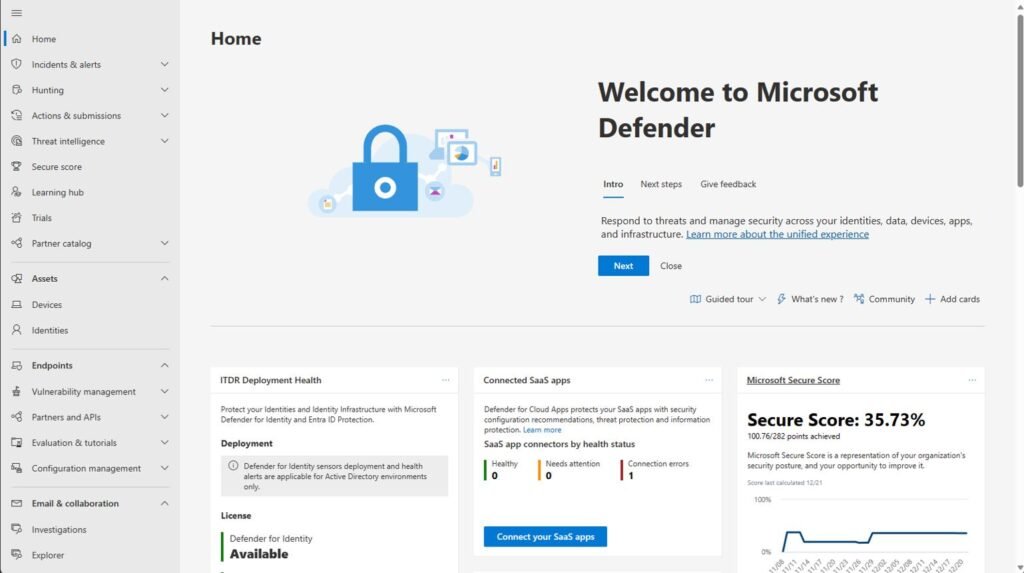
Microsoft Defender is not one single product anymore.
It is now a family of security tools inside the Microsoft ecosystem, including:
- Antivirus protection
- Email filtering
- Endpoint detection and response (EDR)
- Identity protection
- Cloud application monitoring
- Vulnerability management
- Business security dashboards
For UK SMEs, the main versions are usually:
| Product | Typical Use |
|---|---|
| Microsoft Defender Antivirus | Built into Windows |
| Microsoft Defender for Business | Small business protection |
| Microsoft Defender for Endpoint | Enterprise-grade endpoint security |
| Microsoft 365 Business Premium Security Features | Bundled SME security stack |
Where Microsoft Defender Is Actually Very Good
Microsoft has improved Defender massively over the past few years.
Independent testing organisations such as AV-TEST and MITRE ATT&CK Evaluations regularly show Microsoft performing competitively against traditional cyber-security vendors. Attackers noticed this too. Annoyingly for them.
Defender Is Strong At:
Basic Malware Protection

Modern Defender catches:
- Common ransomware
- Trojans
- Known malicious downloads
- Script-based malware
- Suspicious processes
- Many phishing payloads
For everyday threats, it is far better than the terrible antivirus products many SMEs used ten years ago.
Integration With Microsoft 365
If your business already uses:
- Outlook
- Teams
- OneDrive
- SharePoint
- Azure AD
- Windows 11 Pro
then Defender integrates cleanly into the ecosystem.
That matters because modern cyber attacks usually move through:
- identities
- cloud accounts
- shared files
rather than simply dropping a virus onto one PC.
Built-In Security Features
Many small businesses already pay for security features without realising it.
For example, Microsoft 365 Business Premium includes:
- Defender for Business
- Conditional access
- Multi-factor authentication
- Intune device management
- Email filtering
- Basic endpoint detection
That bundle is often one of the best-value security platforms for UK SMEs.
Where Microsoft Defender Is NOT Enough
This is the important part.
Defender is a tool.
It is not:
- a cyber-security strategy
- a backup platform
- staff training
- 24/7 monitoring
- disaster recovery
- human judgement
Many businesses install Defender and assume they are “covered”.
That is roughly equivalent to locking your front door while leaving the warehouse shutter open and hanging a sign saying “key under plant pot”.
Defender Does Not Stop Human Mistakes
Phishing Is Still The Biggest Threat

The UK Government’s Cyber Security Breaches Survey 2025 consistently shows phishing as one of the most common attack methods affecting UK businesses.
Defender may block many malicious emails.
But modern phishing attacks increasingly use:
- legitimate Microsoft login pages
- stolen session cookies
- QR code phishing
- MFA fatigue attacks
- supplier impersonation
- AI-generated emails
A staff member approving the wrong MFA request can bypass enormous amounts of technical protection.
Defender Alone Does Not Replace Backups
One of the biggest SME mistakes in England:
“We use OneDrive so we’re backed up.”
Not necessarily.
Ransomware can:
- encrypt synced files
- corrupt cloud versions
- delete data
- spread across synced devices
Proper backup strategy means:
- immutable backups
- versioning
- offline copies
- tested recovery procedures
Without this, a business can still lose:
- invoices
- CAD files
- customer records
- accounting systems
- emails
- CRM databases
Defender Requires Correct Configuration
Default Settings Are Often Weak

This is where many SMEs fail.
Microsoft security can be excellent if configured properly.
But many businesses:
- never enable advanced policies
- leave MFA optional
- allow unmanaged devices
- keep weak passwords
- ignore alerts
- never review logs
- give everybody admin access
Attackers actively search for badly configured Microsoft 365 tenants.
And there are a lot of them.
Real-World Examples Of Businesses Still Being Compromised
MGM Resorts Attack
In 2023, MGM Resorts International suffered a major cyber attack linked to social engineering.
Attackers reportedly convinced the IT helpdesk to reset credentials. Once inside, operations were severely disrupted.
Estimated losses reportedly exceeded tens of millions of dollars.
Security software existed.
Humans were still manipulated.
Source:
Reuters Coverage
UK Retail And Logistics Attacks
Multiple UK firms over recent years have been compromised through:
- stolen credentials
- remote desktop exposure
- phishing
- unpatched systems
- supplier compromise
In many cases:
- antivirus existed
- email filtering existed
- Microsoft environments existed
The attackers simply found another route.
How Much Does Microsoft Defender Cost In The UK?
Pricing changes constantly because software vendors enjoy turning licensing into interpretive dance.
Approximate UK SME pricing:
| Product | Approximate UK Cost |
|---|---|
| Windows Defender Antivirus | Included with Windows |
| Microsoft 365 Business Premium | Around £18-£22 per user/month |
| Defender for Endpoint P2 | Higher enterprise pricing |
| Managed MDR Services | Often £20-£80+ per user/month extra |
Official pricing:
How Long Does It Take To Learn?
Basic Usage
A small business owner can learn:
- alert checking
- device overview
- quarantine handling
- user management
within a few days.
Proper Administration
Realistically?


To properly secure a business using Microsoft tools, somebody usually needs knowledge of:
- Microsoft 365
- Azure/Entra ID
- MFA
- conditional access
- device management
- phishing policies
- endpoint detection
- identity protection
- backup strategy
- compliance
- incident response
That can take:
- weeks to become competent
- months to become comfortable
- years to become genuinely good
Which is why many SMEs eventually outsource some security functions.
The Biggest Repercussions Of Relying On Defender Alone
Financial Loss
A ransomware incident can cost a UK SME:
- downtime
- lost sales
- recovery costs
- consultancy fees
- legal fees
- insurance excesses
Even a small attack can spiral into:
- £5,000 to £50,000+
- or far higher if operations stop completely
- MICROSOFT 365 Family | Up to 6 TB of cloud storage, advanced security for your data and devices, and powerful productivi…
- PRODUCTIVITY | Redefine what’s possible with Microsoft Copilot¹ alongside you in Word, Excel², PowerPoint, and OneNote. …
- CREATIVITY | Create, design, and edit where and when you need it with Microsoft Designer and the power of generative AI….
Reputation Damage
Customers increasingly expect:
- secure handling of data
- fast communication
- resilience
One breach can seriously damage trust.
Especially for:
- accountants
- solicitors
- estate agents
- healthcare providers
- ecommerce businesses
Regulatory Problems
Under Information Commissioner’s Office and UK GDPR rules, businesses may need to report serious breaches.
Source:
ICO Personal Data Breaches Guidance
Poor security controls can worsen:
- investigations
- fines
- insurance disputes
- customer claims
Downtime

This is often the hidden killer.
Many SMEs survive the hack itself.
What destroys them is:
- 10 days without invoicing
- staff unable to work
- broken scheduling
- inaccessible emails
- lost bookings
- delayed payroll
Cyber attacks increasingly behave like operational disasters, not just “IT problems”.
So What Should A Small English Business Actually Have?
For most UK SMEs, a sensible setup looks like this:
| Security Area | Recommended |
|---|---|
| Endpoint Security | Microsoft Defender for Business |
| MFA | Mandatory everywhere |
| Email Security | Microsoft Defender policies + filtering |
| Backups | Separate immutable backup system |
| Staff Training | Basic phishing awareness |
| Password Security | Password manager |
| Device Management | Intune or equivalent |
| Monitoring | Managed MDR or periodic reviews |
| Updates | Automated patching |
| Incident Plan | Simple documented response process |
Is Defender Worth Using?
Absolutely.
For many UK small businesses, Microsoft Defender is now one of the best starting points available.
Especially if:
- budgets are tight
- staff are already using Microsoft 365
- there is no internal IT department
But the dangerous assumption is this:
“We installed Defender, therefore we are secure.”
That assumption has cost businesses millions.
Modern cyber security is layered:
- technology
- people
- policies
- backups
- monitoring
- recovery planning
Defender is one layer.
A useful layer.
Sometimes a very good layer.
But relying on it alone is a gamble many SMEs do not realise they are taking until the invoice systems stop working and somebody in finance starts quietly panicking into a Tesco meal deal at 2pm. Humans truly built civilisation only to spend half of it resetting passwords.