Short answer: yes, it can happen, although the risk depends heavily on how the laptop is configured, whether it is connected to the internet, and whether malware was already installed earlier.
A laptop in sleep or standby mode is not fully turned off. Some components remain powered, memory may still contain information, and network interfaces can remain active. Because of that, researchers and cyber-security reports confirm that under certain conditions attackers can still interact with the device or its data.
Below is the clearer explanation of what can realistically happen.
How a Laptop Works in Standby or Sleep Mode

What standby or sleep actually means
When you close the lid or choose Sleep / Standby, your laptop usually:
- Stops most programs
- Keeps the contents of memory (RAM)
- Maintains low-power operation
- Often keeps the network card powered
This is why the laptop wakes almost instantly when you open the lid.
However, the trade-off is that the device is not completely isolated from the network or its internal memory.
Can Hackers Access a Laptop That Is Sleeping?
1. Network Wake-Up Attacks
Wake-on-LAN technology
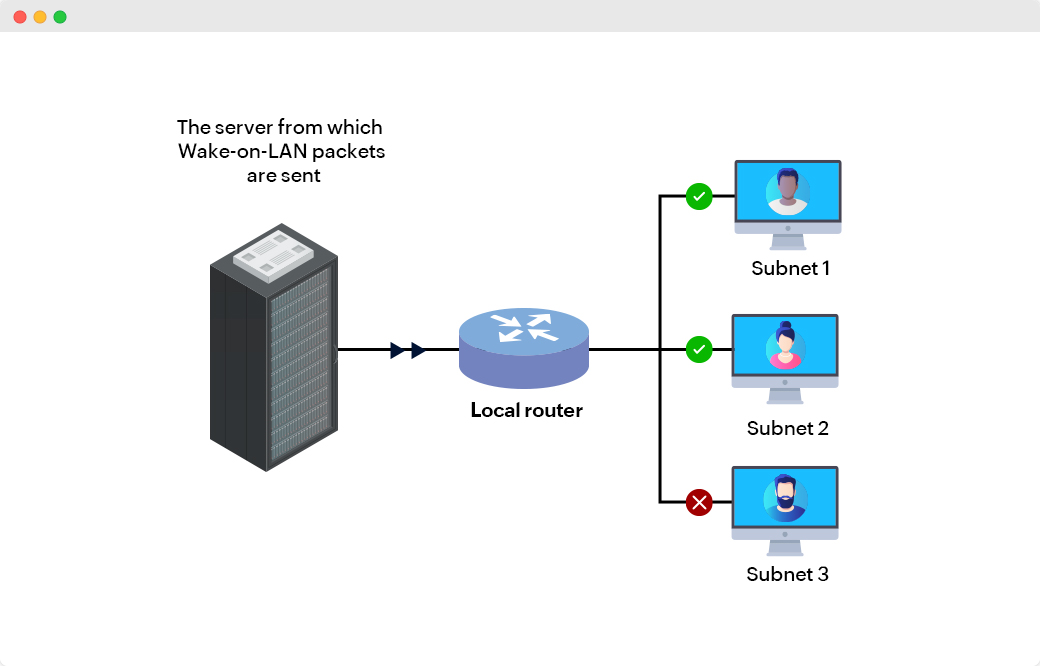
Many computers support a feature called Wake-on-LAN, which allows a machine to be remotely awakened by a network message.
This feature exists for legitimate reasons such as:
- IT departments updating computers overnight
- Remote maintenance
- automated backups
But if misconfigured or exposed to the internet, attackers could potentially wake a machine and attempt to access services running on it.
Important point:
Wake-on-LAN does not bypass passwords or encryption on its own, but it can bring a system online so other attacks become possible.
2. Malware Already Installed Before Sleep
The most common real-world scenario
In most cyber incidents the compromise happens before the device sleeps, not during it.
If malware is already installed, it can:
- continue running background processes
- reconnect to command-and-control servers
- steal data once the computer wakes
One example is spyware, which secretly collects information from the system and transmits it elsewhere.
Such malware may access:
- documents
- saved passwords
- browsing history
- screenshots or keystrokes
This is why cyber security professionals emphasise endpoint protection even when a device is idle.
3. Physical Access Attacks

If someone physically accesses a sleeping laptop, the risks increase significantly.
Security researchers call one category the “evil maid attack”, where an unattended device is modified so the attacker can access it later.
Examples include:
- installing malicious firmware
- copying encryption keys from memory
- inserting hardware implants
Another example is the Thunderspy vulnerability, where researchers showed a laptop could be compromised through a Thunderbolt port with brief physical access.
These attacks are rare for ordinary home users but very relevant for corporate or government devices.
What Could Happen to Your Files and Folders?
Possible consequences of a compromised laptop
If a hacker successfully gains access to your laptop, they could:
1. Copy or steal files
Documents, photos and confidential work files can be copied without obvious signs.
2. Install spyware
Spyware can monitor activity and collect information without the user noticing.
3. Access saved passwords
Browsers and applications often store credentials that attackers can extract.
4. Encrypt files with ransomware
Attackers could lock files and demand payment to restore access.
5. Use your laptop as a launch point
Compromised machines are often used to attack other systems or send spam.
Expert Perspective From Security Researchers
Why sleep mode is less secure than shutdown
Cyber-security specialists often recommend shutting down devices when security is critical because a powered-off device cannot accept remote connections or run malware processes.
Research also shows sleep mode can expose memory data and encryption keys under certain circumstances, especially during forensic or physical attacks.
That does not mean sleep mode is unsafe for everyday use, but it explains why high-security environments avoid it.
Realistic Risk for Everyday Laptop Users in England
Let’s remove the Hollywood drama for a moment.
Extremely unlikely scenarios
- A hacker randomly targeting your sleeping laptop directly
- remote wake-up attacks from the internet without prior access
More realistic scenarios
- clicking a phishing link that installs malware
- installing unsafe software
- connecting to compromised public Wi-Fi
- leaving a laptop unattended in public places
In other words, most compromises occur while the laptop is actively being used, not while it sits quietly in standby.

How to Protect Your Laptop
Basic but effective steps
Security experts and government cyber guidance typically recommend:
- Keep Windows or macOS updated
- Use reputable antivirus or endpoint protection
- Enable full-disk encryption
- Use strong passwords and multi-factor authentication
- Disable Wake-on-LAN if you do not need it
- Shut down your device in high-risk environments
- Avoid leaving laptops unattended
Final Verdict
Yes, a laptop on standby can theoretically still be hacked, but the circumstances are limited.
The most common pattern is not a hacker magically breaking into a sleeping machine. Instead, attacks usually happen because:
- malware was installed earlier
- the laptop is awakened remotely via network features
- someone gains physical access to the device
So the real lesson is simple:
sleep mode does not equal security, but with basic protections in place the risk for everyday users remains relatively low.
We have created Professional High Quality Downloadable PDF’s at great prices specifically for Small and Medium UK Businesses our main website. Which include various helpful Cyber related documents and real world scenarios your business might experience, showing what to do and how to protect your business. Find them here.